Tiny Planes Airport Building Guide
Draw runways and taxiways at any angle, fit jet bridges, and build custom hangars without choking traffic.
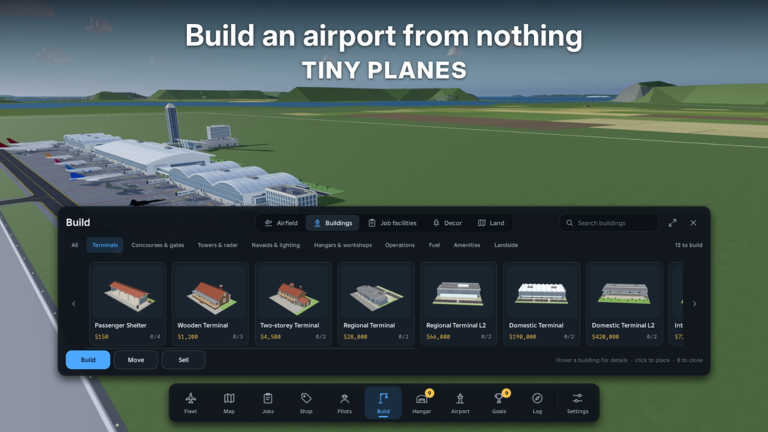
The Build Update turns Tiny Planes from “place a straight starter strip” into a proper creative airfield sandbox. You can draw curved taxiways, roads, and runways at any angle, drop gates with self-fitting jet bridges, and assemble hangars, control towers, and lights from resized, rotated, and painted custom parts. This guide focuses on layouts that still move airplanes — because a gorgeous airport that gridlocks AI and players fails the tycoon half of the game.
New captains should finish the tutorial runway steps in Getting Started before redesigning everything. Learn Controls enough to test your own approaches after each major geometry change.
What the Build Update unlocked
- Freeform pavement — Runways, taxiways, and roads are no longer limited to stiff cardinal grids. Curves and arbitrary angles let you follow terrain and pack more function into awkward island footprints.
- Gates with self-fitting jet bridges — Bridges adapt to the gate/aircraft relationship, reducing fiddly manual alignment when you change fleets.
- Custom parts construction — Resize, rotate, and paint pieces to prototype hangars, towers, lighting, and scenic structures that match your airline brand.
Creativity is encouraged; throughput is required. Always ask: can a dispatched flight leave, fly, return, and park without a human babysitter?
Runway design principles
- Length before luxury — Support the aircraft you actually operate. Stretching for future heavies is fine; stubby fashion runways that clip tails are not.
- Clear approaches — Keep departure and arrival corridors free of towers, decorative arches, and friend-built obstacles. If you hand-fly tests and keep hitting props, the layout is wrong.
- Angle with purpose — Any-angle runways are for wind imagination, terrain fit, and parallel operations — not random scribbles. Pick a primary heading and commit so muscle memory and AI paths stay consistent.
- One hero runway first — A single excellent strip beats three half-finished ones. Add parallels only when traffic or role separation (airliner vs emergency) demands it.
After editing pavement, fly a manual circuit. Autopilot (T) can mask bad thresholds that human landings reveal instantly.
Taxiways and roads
Curved taxiways shine when they:
- Connect runway exits to gate aprons without hairpin traps.
- Provide bypasses so one stopped plane does not freeze the field.
- Separate ground service / scenic roads from hot aircraft paths when possible.
Avoid:
- Dead-end spurs that look cool in build camera but trap AI.
- Unmarked merges right at the hold-short line.
- Decorating the centerline with props players will collide with at night or with UI hidden (H).
Think like a ground controller: every curve should answer “where does this plane go next?” If you cannot answer, delete the segment.
Gates and jet bridges
Self-fitting jet bridges are the quality-of-life centerpiece of modern Tiny Planes terminals. Practical tips:
- Space gates for your largest expected wingspan, not just the tutorial puddle jumper.
- Align lead-in taxi lines so nosewheels track naturally; bridges cannot fix a gate that faces a ditch.
- Stage pushback room behind the gate so departures are not nose-to-nose with arrivals.
- Label mentally by role — short-haul, long island hop, VIP barn-find showplane — even if you do not paint numbers yet.
When you add fleet from shop restocks (~15 minutes) or restore a barn find, re-check gate clearance before scheduling that airframe into a tight slot.
Custom hangars, towers, and lights
Custom parts let you brand the island:
- Hangars — Protect showpieces and give visual weight to the maintenance story. Leave door clearances honest.
- Control towers — Place for sight lines and screenshots, but keep them off approach paths. Height is not an excuse to spear finals.
- Lights — Edge lighting and apron lamps help dusk sessions and look premium on overview shots. Consistency beats random neon.
Paint and rotation are easy to overdo. Pick a palette that matches your airline fantasy and repeat it. The wiki homepage screenshots of real fields look coherent for a reason — clutter reads as unfinished even when every part is “done.”
Efficient layout patterns
Starter efficient hub
- One primary runway
- Parallel or gently curved taxiway to a small gate cluster
- Hangar off to the side, not blocking exits
- Tower offset from centerline
- Room to extend runway ends later without demolishing the terminal
Growth hub
- Extended or second runway when traffic demands
- Segregated general aviation / VIP pad for barn-find trophies
- Dedicated staging for disaster airframes so emergency spawns do not clog passenger gates
- Road access for scenic ground vehicles without cutting active taxiways
Multiplayer-friendly field
Up to five players keep private islands but visit each other. Build a clearly readable visitor runway and a temporary parking spur so guests are not inventing their own gate on your active bridge. Courtesy signage (even simple color coding) reduces mid-air arguments.
Build → test → iterate loop
- Change one major system (runway or terminal or lighting).
- Dispatch an AI flight and hand-fly one circuit.
- Watch for nose-to-nose conflicts, short rollouts, or bridge misses.
- Fix pavement before adding more decorative parts.
- Recheck after shop purchases or code-funded fleet jumps (Codes, tier list).
Players who decorate first and test never spend twice as long bulldozing art.
Funding the remodel
Big pavement projects cost attention and cash. Keep routes alive with Josi and later pilots while you bulldoze. Claim daily rewards and playtime boosts, redeem codes when available, and time aircraft buys to shop restocks so you are not broke mid-renovation. Disaster missions can inject cash between build sessions if you already have suitable emergency airframes.
How building ties to the rest of the game
- Controls — You must be able to validate approaches; pretty GIS is worthless if you cannot land it.
- Barn finds — Restored classics may need longer strips or VIP parking.
- Disasters — Emergency careers benefit from clear staging areas and unobstructed departures.
- Fleet goals — Heading toward 150+ real aircraft means planning apron growth early so you are not demolishing the terminal every restock.
Common building mistakes
- Curving taxiways into artwork that AI cannot solve.
- Placing towers on final.
- Gates packed tighter than your widest wingspan.
- Zero bypass when one plane stops for a screenshot.
- Rebuilding during peak dispatch without a temporary runway.
Suggested build order after the tutorial
- Perfect the tutorial runway length and clearways.
- Add a simple taxi loop to one gate with a working jet bridge.
- Place a modest hangar and offset tower.
- Light the edges.
- Only then curve scenic roads and flex façades.
- Expand when dispatch volume or multiplayer visits demand it.
Airport building in Tiny Planes is half city-planner, half pilot. Use freeform tools to solve real traffic problems, let self-fitting bridges save alignment time, and save the wildest custom parts for areas that never sit on a hot centerline. When the field works, every other guide on this wiki — flying, exploring, rescuing — gets easier.
Frequently Asked Questions
Quick answers for Tiny Planes pilots and airport builders.
What did the Tiny Planes Build Update add?
Curved taxiways, roads, and runways at any angle; gates with self-fitting jet bridges; and custom parts for hangars, towers, lights, and other structures.
Should I rebuild my tutorial runway immediately?
Improve it, yes — replace it entirely only after you understand traffic flow. Keep one working strip online while you remodel.
How do self-fitting jet bridges help?
They adapt to gate and aircraft pairing so you spend less time manually aligning bridges when your fleet changes.
Why do my planes get stuck on the ground?
Usually dead-end taxiways, missing bypasses, or decorations on hot paths. Simplify curves and test with a dispatched flight plus a manual circuit.
How does building relate to barn finds and disasters?
Longer or clearer runways help restorables and emergency departures. Keep VIP and disaster staging from blocking passenger gates.